What Is Polyosync? A Complete Guide to AI Employees for Modern Businesses
Discover Polyosync, an AI workforce platform that helps businesses manage customer interactions, capture leads, support bookings and automate internal workflows. Learn how customer-facing AI and internal AI work together to reduce repetitive tasks and help teams operate more efficiently.
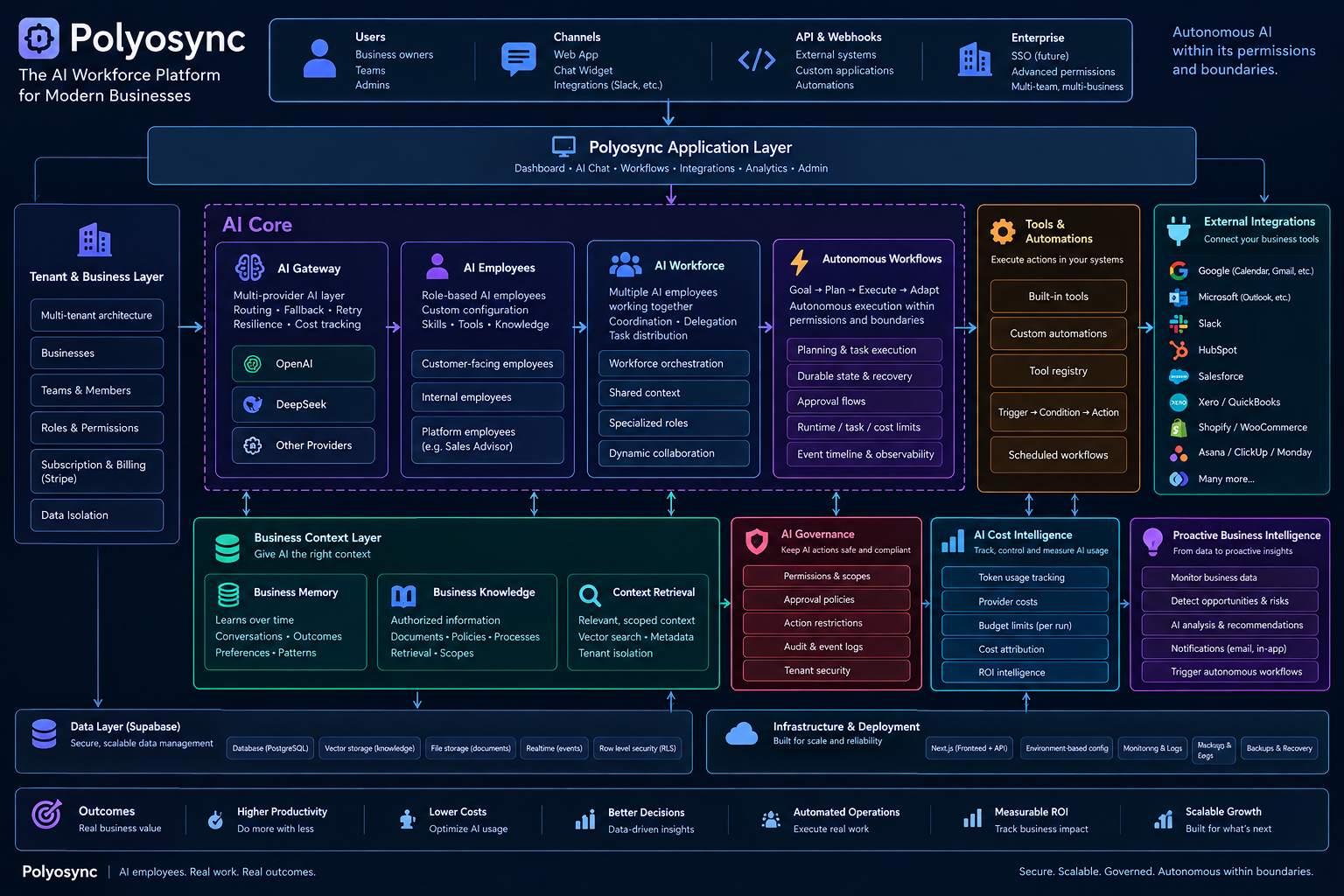
What Is Polyosync? A Complete Guide to AI Employees for Modern Businesses
Businesses today are expected to respond faster, provide better customer experiences and operate more efficiently than ever before. Customers want immediate answers, sales teams need to follow up consistently, bookings need to be managed, and internal teams must keep projects and operations moving.
Yet many businesses still rely on people to perform the same repetitive tasks every day: answering common questions, collecting customer information, qualifying leads, managing enquiries, coordinating bookings and updating information across different tools.
These tasks are necessary, but they can consume valuable time that teams could otherwise spend on work requiring human judgement, creativity and expertise.
Polyosync was built to help businesses approach these challenges differently.
Polyosync is an AI workforce platform that enables businesses to create and manage AI Employees designed for specific business roles, customer interactions and operational workflows.
Rather than treating AI as just another chatbot, Polyosync provides a way to configure AI Employees around the actual tasks a business needs to handle.
But what does that mean in practice, and how can businesses use it?
What Is Polyosync?
Polyosync is a platform designed to help businesses put AI to work across customer-facing activities and internal business operations.
Through Polyosync, businesses can configure AI Employees for roles such as customer support, sales assistance, lead qualification, booking enquiries, customer follow-ups and business communication.
Each AI Employee can be configured for a particular role, given relevant knowledge and made available through the supported channels and integrations appropriate to that use case.
For example, an online store could use an AI Employee to answer questions about products, explain its returns policy and guide customers towards the appropriate next step.
A service business could configure an AI Employee to answer frequently asked questions, collect information from prospective customers and help manage booking enquiries.
An internal team could use AI-powered workflows to support repetitive operational tasks and coordinate activities across connected business tools.
The objective is straightforward: help businesses handle recurring work more efficiently without requiring employees to manually manage every interaction or process.
Polyosync is not about replacing every person in a business. It is about identifying work that can be handled reliably through properly configured AI and automation, while allowing people to focus on situations where their involvement matters.
The Problem: Businesses Lose Time to Repetitive Work
Many business processes appear small when considered individually.
Answering a question about pricing takes a minute. Responding to a booking enquiry takes a few minutes. Asking a prospective customer for missing information takes another interaction. Following up with a lead requires someone to remember that the conversation happened in the first place.
However, these tasks accumulate.
A business receiving dozens or hundreds of enquiries may spend a significant amount of time answering similar questions instead of concentrating on sales, service quality or growth.
The same problem exists internally. Employees may need to move information between applications, coordinate tasks, check updates, prepare routine communications and complete repetitive administrative work.
When these processes depend entirely on manual attention, several problems can arise: -Customers may wait longer than expected for answers. -Sales enquiries may be overlooked or followed up inconsistently. -Teams may spend too much time answering the same questions. -Booking enquiries may require unnecessary back-and-forth communication. -Employees may switch repeatedly between different tools. -Business processes may become harder to manage as the company grows.
Hiring additional people can help, but it is not always the only available solution.
Some recurring tasks can be handled by AI Employees, automation and connected workflows, provided that they are configured appropriately and operate within clearly defined limits.
This is where Polyosync comes in.
The Solution: A Configurable AI Workforce
Polyosync gives businesses a structured way to configure AI Employees around specific responsibilities.
Instead of expecting one general-purpose chatbot to handle everything, a business can define different roles according to its operational needs.
An AI Employee can be configured with relevant instructions, knowledge and supported integrations to help it perform its intended function.
The business determines what the AI Employee should do, what information it can use, which tasks it should support and when a human should become involved.
Depending on the configuration and available integrations, an AI Employee may help with: -Answering frequently asked customer questions. -Providing information about products and services. -Collecting contact details and lead information. -Qualifying prospective customers using predefined criteria. -Supporting booking enquiries. -Providing information about policies and business procedures. -Assisting with customer follow-ups. -Supporting internal communication and recurring workflows. -Connecting customer interactions with relevant business processes.
Not every AI Employee performs every task. Its capabilities depend on its assigned role, its configuration, the knowledge provided to it and the integrations available to the business.
This distinction matters because useful business AI is not simply about generating answers. It is about giving AI a defined purpose within a real business process.
Customer-Facing AI: Helping Businesses Serve Their Customers
Customer-facing AI is designed to interact directly with customers and prospective customers.
These interactions may take place before a purchase, during a service enquiry or after a customer has already bought something.
The objective is to make relevant information easier to access and help customers move towards the appropriate next step.
1. Customer Support
Customer support teams frequently answer the same questions about opening hours, delivery, pricing, product information, policies and available services.
A properly configured customer-facing AI Employee can use approved business knowledge to answer these questions without requiring a human to respond manually to every routine enquiry.
For example, an online store could provide information about its delivery policy or explain how its return process works.
If a customer asks a question that requires an individual account check, an exception or a decision outside the AI Employee's permissions, the interaction can be directed towards a human or an appropriate supported process.
The aim is not to prevent customers from reaching people. It is to reduce unnecessary repetitive work while preserving a route to human assistance.
2. Lead Capture and Qualification
Not every enquiry represents the same opportunity.
Some prospective customers are simply researching. Others are ready to purchase, request a quotation or arrange a consultation.
A sales-focused AI Employee can ask predefined questions, collect relevant information and help identify whether an enquiry meets the business's qualification criteria.
For example, a B2B service provider might want to understand a prospect's company size, requirements, budget range and intended timeframe before arranging a sales conversation.
Instead of requiring a team member to collect every detail manually, the business can configure the AI Employee to gather the information and support the next stage of the process.
This can help sales teams spend more time evaluating opportunities and less time collecting basic information.
3. Booking Enquiries
Businesses that depend on appointments often receive recurring questions about availability, services, prices and booking procedures.
A booking-focused AI Employee can answer supported questions, guide customers through the booking process and, where the necessary integration and permissions are configured, help connect enquiries with a booking system.
Polyosync supports a Calendly integration for relevant use cases.
The precise booking actions available depend on the configured workflow and integration. The purpose is to make the booking experience more straightforward while reducing unnecessary manual communication.
4. Customer Communication and Follow-Up
A conversation with a prospective customer should not necessarily end when the first question has been answered.
Businesses may need to follow up on enquiries, clarify requirements or guide customers towards a next step.
AI Employees and supported automation workflows can help structure these interactions and reduce the likelihood of repetitive communication being forgotten.
Any automated follow-up should respect the business's communication rules, customer preferences and applicable consent requirements.
Internal AI: Supporting the Work Behind the Scenes
Customer-facing AI focuses on interactions with customers. Internal AI focuses on the processes, tasks and coordination that happen inside a business.
This is an important distinction.
A business does not only spend time communicating with customers. It also spends time managing information, coordinating teams, updating systems and carrying out recurring operational activities.
Internal AI can help support these processes when it has the necessary instructions, context, integrations and permissions.
Depending on the configured use case, this may include: -Helping teams work with internal business knowledge. -Supporting routine business communication. -Coordinating recurring tasks through connected tools. -Assisting with information processing and operational workflows. -Reducing repetitive administrative activities. -Supporting handoffs between different stages of a process.
For example, a business could explore a workflow that connects a new enquiry with its CRM, creates a task for the relevant team and prepares information for follow-up, provided the necessary integrations and automation steps are available.
The important point is that internal AI should be configured around an actual operational requirement, not introduced simply because a business wants to use AI.
The value comes from making a process easier to execute, manage and improve.
Customer-Facing AI and Internal AI: Why Businesses May Need Both
Customer-facing AI and internal AI address different parts of the same business.
Customer-facing AI helps manage interactions with the outside world. Internal AI helps support the processes that keep the business operating.
Consider a company that receives a new customer enquiry.
A customer-facing AI Employee could collect the customer's requirements and qualify the enquiry. A connected workflow could then pass relevant information to a CRM or notify the appropriate team. An internal AI-supported process could help the team organise the next steps, depending on the tools and permissions configured.
The customer interaction and the internal process are different responsibilities, but they can form part of a connected workflow.
This is why businesses should consider more than the chatbot itself.
The broader opportunity is to identify where AI can assist with customer interactions, where automation can connect business processes, and where people should remain responsible for decisions and exceptions.
Polyosync is designed to support this wider approach through its AI Employee platform, configuration capabilities and supported integrations.
How Does Polyosync Work?
Although every business has different requirements, setting up an AI Employee generally involves several key steps.
Step 1: Identify the Business Problem
Start with a specific, recurring task.
It could be answering common product questions, collecting information from leads, handling booking enquiries or supporting an internal workflow.
The clearer the problem, the easier it is to define what success should look like.
Step 2: Define the AI Employee's Role
Determine what the AI Employee is responsible for.
For example, a customer support AI Employee might answer questions about delivery, returns and product information. A lead qualification AI Employee might collect contact details and ask predefined questions.
Defining the role helps keep the experience focused and makes it easier to establish appropriate boundaries.
Step 3: Provide the Relevant Knowledge
An AI Employee needs relevant business information to respond appropriately.
Depending on the use case, this may include FAQs, product information, service descriptions, policies, procedures and other approved knowledge sources.
The quality and accuracy of this information matter. Outdated or contradictory content can lead to poor responses, so business knowledge should be reviewed regularly.
Step 4: Configure the Experience and Workflow
Configure how the AI Employee should communicate, what it should ask, which tasks it should support and what should happen when additional assistance is required.
Where supported, integrations can connect the AI Employee or its workflow to the business's existing tools.
The objective is to fit the AI Employee into the business process rather than force the business to redesign everything around the technology.
Step 5: Test Before Relying on It
Before putting an AI Employee into regular use, test realistic customer questions, unusual requests, missing information and situations that require human assistance.
Check whether its answers are accurate, whether it follows its instructions and whether the expected workflows behave correctly.
Businesses should also define what the AI Employee must not do, particularly when handling sensitive information, making commitments or taking actions that require human approval.
Step 6: Measure and Improve
After deployment, review performance using the metrics relevant to the role.
These may include response times, enquiry volumes, lead completion rates, booking conversions, successful handoffs and the amount of repetitive work handled.
The right metrics depend on the business problem. The purpose is to understand whether the AI Employee is producing a measurable operational improvement and where it needs refinement.
Polyosync Integrations: Connecting AI with Business Tools
AI becomes more useful when it can support the systems a business already uses.
Polyosync offers integrations across a range of business applications and services, including tools for CRM, e-commerce, communication, productivity, customer support and payments.
Examples include: -CRM and sales: HubSpot, Salesforce. -Customer support: Zendesk, Freshdesk, Help Scout. -E-commerce: Shopify, WooCommerce. -Communication: Slack, Outlook, Twilio SMS. -Productivity and project management: Asana, ClickUp, Monday.com, Trello, Notion. -Marketing: Mailchimp, Brevo. -Payments and business operations: Stripe, Xero. -Scheduling: Calendly.
The exact actions supported by each integration depend on its implementation, permissions and configuration. The availability of an integration does not automatically mean that every possible action within that application is supported.
For businesses, the practical objective is to reduce disconnected processes and make AI-assisted work more relevant to existing operations.
Rather than adding another isolated tool, businesses can evaluate where Polyosync's AI Employees and supported integrations fit into their current workflows.
Who Can Use Polyosync?
Polyosync can be relevant to businesses across different industries because repetitive communication and operational tasks exist in many types of organisations.
Polyosync can be relevant to businesses across different industries because repetitive communication and operational tasks exist in many types of organisations.
Online stores can explore AI Employees for product questions, delivery information, returns policies, customer enquiries and lead capture.
Professional Services
Consultancies, agencies and B2B service providers can explore AI Employees for initial enquiries, service information, lead qualification and consultation requests.
Beauty and Personal Care
Salons, nail technicians and hairstylists can use customer-facing AI concepts to answer recurring questions about services, prices and appointment procedures.
Small and Growing Businesses
Smaller businesses often have limited time and resources. AI Employees can help them evaluate which recurring tasks could be handled more efficiently without immediately increasing their administrative workload.
Larger Teams and Organisations
Teams with established processes can explore AI and automation for specific support, communication and operational use cases, subject to their security, access-control and integration requirements.
The suitability of any use case depends on the process, the available data, the required integrations and the level of human oversight needed.
What Makes an AI Employee Different from a Basic Chatbot?
A basic chatbot is often designed primarily to answer questions or guide a user through a limited interaction.
An AI Employee is configured around a particular business role and can combine relevant knowledge, instructions and supported capabilities to help perform that role.
The distinction is not that every AI Employee can autonomously complete every task. It is that the business can define a more specific purpose and evaluate the AI against that purpose.
For example, a basic website chatbot might provide general information about a service.
A more purpose-specific AI Employee could be configured to answer questions about that service, collect information about the customer's requirements, qualify the enquiry according to predefined criteria and guide the customer towards a suitable next step.
Where the required integrations and workflows are available, the process may extend beyond conversation into connected business operations.
A well-designed AI Employee also needs boundaries. It should recognise when it lacks information, avoid inventing answers and direct requests to a human when the situation requires it.
Does Polyosync Replace Human Employees?
No. Polyosync is designed to help businesses identify and manage work that can be supported by AI Employees and automation.
Human employees remain important for judgement, relationship-building, complex problem-solving, exception handling and decisions that require accountability.
A practical approach is to determine which tasks are repetitive and suitable for automation, which tasks need human review and which responsibilities should remain entirely human-led.
For example, an AI Employee might answer a routine question about a published returns policy, while a human handles a disputed refund or an unusual customer complaint.
This division of responsibilities can help businesses use AI more deliberately, without assuming that automation is appropriate for every situation.
How Can Businesses Measure the Value of Polyosync?
The value of an AI Employee should be measured against the problem it was introduced to solve.
Businesses can begin by establishing a baseline before deployment.
Useful measurements may include:
Time spent on repetitive tasks: How many staff hours are currently spent answering routine questions or collecting standard information?
Response times: How long do customers typically wait for answers before and after deployment?
Lead qualification: Does the business collect more complete information from prospective customers?
Booking performance: Does the configured experience help customers move through the booking process with less friction?
Human handoffs: Are complex enquiries reaching the right person with sufficient context?
Workflow completion: Are connected tasks being created, routed or processed as intended?
Customer experience: Are customers receiving accurate, relevant answers and an appropriate route to human assistance?
Financial value can then be estimated using the actual results.
For example, if an AI Employee handles a meaningful volume of routine enquiries, the business can estimate the staff time released and compare the value of that time with the platform cost and implementation effort.
However, time saved should not automatically be treated as cash saved. The business needs to determine whether the recovered time improves productivity, increases capacity, supports additional revenue or reduces actual expenditure.
Measuring results in this way provides a more useful basis for deciding whether to expand an AI initiative.
Getting Started with Polyosync
Businesses do not need to automate every department at once.
A more practical starting point is to choose one repetitive task with a clear business impact.
Identify the current process, define the intended outcome, configure an AI Employee for that role and test it using realistic scenarios.
Once the process works reliably, measure the results and decide whether the use case should be improved, expanded or connected to additional workflows.
This approach helps businesses move from experimenting with AI to evaluating its practical contribution to daily operations.
Polyosync provides a platform for exploring these use cases through configurable AI Employees and supported business integrations.
The Future of Business AI Is About More Than Conversations
AI is often introduced to businesses through chatbots and content-generation tools. These applications can be useful, but business operations involve much more than producing a response to a question.
Businesses also need to capture information, manage enquiries, coordinate work, support customers and keep processes moving between different systems.
The opportunity is to connect AI with the actual responsibilities and workflows that exist inside an organisation.
Customer-facing AI can help businesses manage interactions. Internal AI and automation can support the processes behind those interactions. Together, they can form part of a more structured approach to business AI.
That is the thinking behind Polyosync: helping businesses configure AI Employees around real business needs, rather than treating AI as a standalone feature with no defined role.
Polyosync helps businesses explore how AI Employees can support the work they do every day — from customer enquiries and lead qualification to connected workflows and internal operations.
The starting point is simple: identify the problem, define the role, configure the solution and measure the result.
Ready to Explore AI Employees for Your Business?
Explore Polyosync to discover how configurable AI Employees can support customer-facing activities and business workflows.
Start with a specific business challenge and identify where AI could help your team spend less time on repetitive tasks and more time on work that moves the business forward.
Visit Polyosync to learn more about the platform and explore the possibilities for your business.